
Features
Every feature your encrypted vault needs.
10 powerful features that work together — no bloat, no plugins, no configuration hell. Write, encrypt, search, share, sync.

Encryption
Encrypt anything, anywhere in your notes.
Secret blocks are AES-256-GCM encrypted containers that live inline with your markdown. Drop one into any page — a login, an API key, a credit card — and it's encrypted at rest with a unique nonce. Everything else on the page stays plaintext and searchable.
8 built-in templates
Website Login
Credit Card
Bank Account
API Key
SSH Key
Wi-Fi
Identity Document
Custom
Key behaviors
- Click to reveal, click to copy
- Auto-hides after 30 seconds
- Clipboard cleared after 30 seconds
- Unique nonce per block — no two encrypted alike
# Travel Finances
Budget tracking for 2026 Europe trip.
Travel Card
Credit Card
Cardholder V. Singh
Number 4532 **** **** 8901
Expiry •• / ••
CVV •••
Remember to set travel alert before departure.
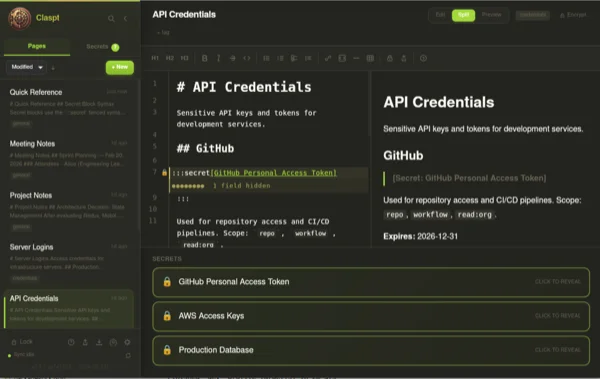
Editor
A real editor, not a "notes field."
Built on CodeMirror 6 — the same editor engine that powers VS Code's web version. Full GitHub Flavored Markdown with live syntax highlighting, not a stripped-down textarea pretending to be an editor.
50+ languages Syntax highlighting for code blocks
GFM tables Tab-navigable, resize-aware
Split view Editor + live preview side by side
Vim / Emacs Optional keybinding modes
7 font choices JetBrains Mono, Fira Code, SF Mono, Monaco, Cascadia Code, Source Code Pro, Inconsolata
14 themes From Nord to Dracula to Rose Pine
# API Design Notes
## Authentication Flow
Use OAuth2 with PKCE for all public clients.
rust
pub fn verify_token(token: &str) -> Result<Claims> {
let key = decode_key("RS256")?;
jsonwebtoken::decode(token, &key, &validation)
}
## Rate Limits
Endpoint Limit Window
/auth 10 1 min
/api/v1/* 100 1 min
/search 30 1 min
Search
Find anything in under

Find anything in under
100 milliseconds.
Powered by tantivy — a Rust full-text search engine. Your entire vault is indexed locally. Titles are weighted 3x, tags 2x, and secret labels 2x for smarter ranking via BM25. Filter by folder, tag, or content type.
Smart ranking
Title 3x, Tags 2x, Secret labels 2x, Body 1x
Scope filters
Search within a folder, a tag, or across everything
Cmd+K launcher
Keyboard-first — open search from anywhere instantly
Versioning
Every save is a commit.
Every save is a commit.
Every change is recoverable.
Claspt uses a real git repository under the hood — not a custom undo stack, not a database of snapshots. Every time you save a page, it's committed. You get full history, meaningful diffs, and the ability to roll back to any point in time.
- Auto-commit on every save — no manual steps
- Full version history with date, time, and diff
- One-click rollback to any previous version
- Push to remote git repos Pro
Just now Updated API rate limits table +3 -1
2 hours ago Added authentication flow section +28 -0
Yesterday, 4:12 PM Added Rust code example +12 -3
Yesterday, 11:30 AM Created page +45 -0
Feb 20, 9:00 AM Initial draft +18 -0
Organization
Folders, tags, and
Folders, tags, and
everything in its place.
Your vault is just a folder on disk — no proprietary database, no sync conflict nightmares. Organize with nested folders up to 5 levels deep, add tags with autocomplete, pin important pages, archive what you don't need right now, and duplicate anything in one click.
- Nested folders — up to 5 levels deep
- Tags with autocomplete — create, filter, and search by tags
- Pin pages to the top of any folder
- Archive pages without deleting them
- Duplicate any page in one click
- Assign emoji icons to folders for visual identification
Work
Credentials
AWS Keys cloud
Database Passwords
Projects
API Design Notes api rust
Personal
Travel Finances travel
Old Budget
Biometric
Your face or your fingerprint.
Disabled Re-auth Primary
Your face or your fingerprint.
Your choice.
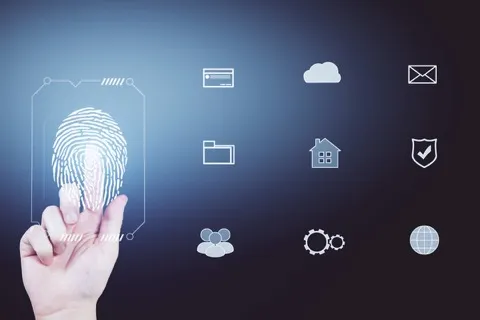
Claspt integrates with your operating system's biometric authentication — Touch ID on macOS, Windows Hello on Windows, fingerprint sensors on Linux. Your master key is stored in the OS keychain and unlocked only via biometric verification. No biometric data ever leaves your device.
Three modes
Password only — classic mode
Biometric to reveal secrets only
Biometric unlocks the entire vault
Recommended Touch ID macOS
Windows Hello Windows
Face ID iOS
Fingerprint Android / Linux
Sync
Pro
Your vault, on every device.
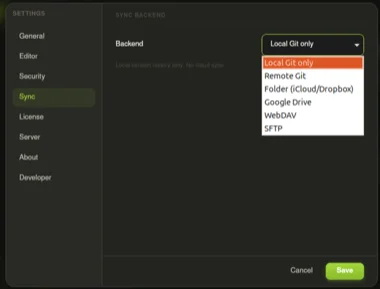
Sync your vault across macOS, Windows, Linux, iOS, and Android using the backend you already trust. Your data never touches our servers — it goes directly from your device to your storage provider, encrypted in transit and at rest.
GitHub, GitLab, Bitbucket, or any git server
Native Apple integration for macOS and iOS
Works with personal and Workspace accounts
Folder-based sync with conflict resolution
Self-host with Nextcloud, Synology, or any server
Security guarantee
Secret blocks are encrypted before they leave your device. Your sync provider stores ciphertext only — they cannot read your secrets even with full access to your files.
Import
Bring your secrets from anywhere.
Migrating from another password manager? Claspt imports your data and converts it into encrypted secret blocks — ready to use in minutes, not hours.
How it works
1
Export Export from your current manager in CSV or native format
2
Import Drag the file into Claspt — automatic field mapping
3
Review Verify imported entries, fix any mapping issues
4
Delete Export Securely delete the unencrypted export file
Sharing
Pro Share secrets without
Share secrets without
compromising security.
Sometimes you need to send a credential to a colleague or a family member. Claspt lets you share entire pages or individual secret blocks — password-protected, time-limited, and optionally self-destructing.
- Password-protected sharing — send entire pages or individual secret blocks
- Configurable expiry: 1 hour, 24 hours, 7 days, or 30 days
- Burn-after-reading: auto-delete after first access
- Share password sent separately (phone, text) for true security
- Email notifications when a share is accessed (optional)
- No third-party service — shares go through the Claspt relay, encrypted end-to-end
Pro 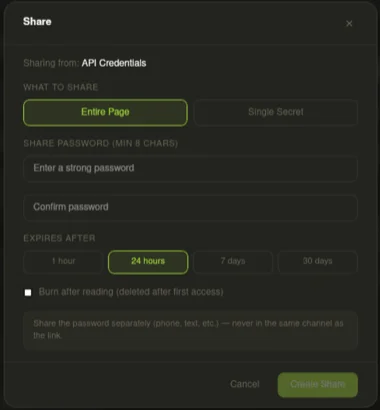
Themes
14 themes. Your vault, your aesthetic.
Not just "dark and light" — 14 handcrafted themes covering every popular color scheme. Switch instantly from settings. Your choice persists across sessions.
Ready to try Claspt?
Download the free desktop app or start a 14-day Pro trial — no credit card required.