
Your notes and secrets, together at last.
A fast, markdown-native vault where your credentials live alongside your notes — encrypted, searchable, and portable. No rigid forms. No cloud dependency. Just your data, your way.
Free forever on desktop. No account required. ~5MB download.
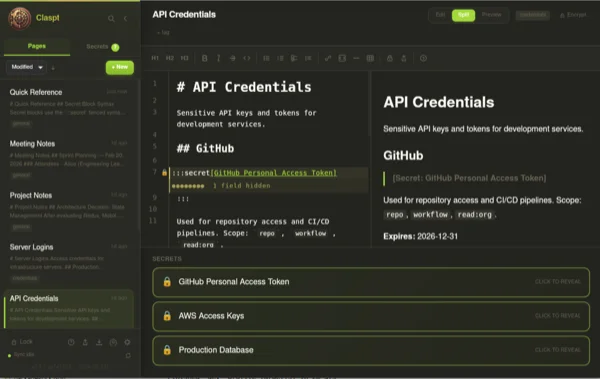
You're juggling too many tools.
Your passwords live in one app. Your notes live in another. Your API keys are scattered across Slack DMs, .env files, and sticky notes. You've normalized the chaos — but it costs you time, security, and peace of mind.
Passwords in one app, notes in another
Context is split across tools. Your deploy notes reference credentials that live in a completely separate vault. Copy-paste is your integration layer.
Rigid forms that don't fit your life
Password managers force you into username/password/URL fields. But what about your SSH keys? API tokens? License keys? Wifi passwords with notes about the router location?
Proprietary lock-in
Your data is trapped in someone else's format, on someone else's server, behind someone else's subscription. Export is an afterthought — if it exists at all.
One vault. Notes + secrets. Encrypted where it matters.
Write Freely in Markdown
Full WYSIWYG and raw markdown editing with syntax highlighting, code blocks, tables, and checklists. Write documentation, meeting notes, journal entries, or technical specs — with the same fluidity you get in a dedicated writing app.
- Full CommonMark + GFM support
- Code blocks with syntax highlighting
- Tables, checklists, and callouts
Embed Encrypted Secrets Anywhere
Press Cmd+Shift+S to insert an encrypted secret block right inside your note. API keys next to deploy instructions. Database credentials next to architecture docs. Context and credentials, together.
- AES-256-GCM encryption per secret
- Reveal with biometric or master password
- Custom fields — not rigid forms
Search Everything in < 100ms
Press Cmd+K and find any note, any secret, any tag — instantly. Full-text search across your entire vault, powered by a Rust-built index that never slows down, even with thousands of entries.
- Full-text search across notes and secrets
- Filter by tags, type, or date
- Fuzzy matching — typo-tolerant
From download to encrypted vault in 2 minutes.
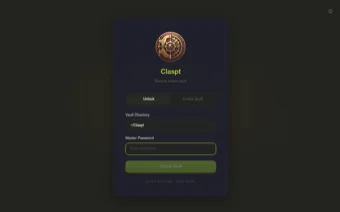
Create Your Vault
Pick a folder. Set a master password. Done. Your vault is a folder of markdown files — human-readable, Git-friendly, and yours forever.
Write Notes, Add Secrets
Full markdown editor. Press Cmd+Shift+S to insert an encrypted secret block. API keys, passwords, license keys — any structure you need.
Search, Sync, Sleep Well
Find anything with Cmd+K. Every save is a Git commit. Sync across devices with Pro. Your data is versioned, encrypted, and always recoverable.
Claspt replaces two tools with one.
| Feature | Password Managers | Notes Apps | Claspt |
|---|---|---|---|
| Free-form markdown notes | |||
| Encrypted secrets | |||
| Data format | Proprietary binary | Varies (often proprietary) | Markdown + JSON |
| Portability | Export as CSV | Export as PDF/MD | Native files — always portable |
| Git version control | Some (manual) | Built in | |
| Secret templates | Rigid forms only | Flexible + templates | |
| Browser autofill | Roadmap* | ||
| Offline-first | Partial | Varies | Always |
| Self-hosted sync | Some | Git-based |
* Browser autofill is on the roadmap. We believe in honesty — we won't claim features we don't have yet.
Everything you need. Nothing you don't.
Encrypted Secret Blocks
AES-256-GCM encryption per secret block. Secrets are encrypted at rest and in memory. Reveal with biometric or master password. Auto-lock after configurable timeout.
Powerful Markdown Editor
Syntax highlighting, code blocks, tables, checklists, callouts, and math blocks. WYSIWYG and raw mode. Keyboard-first with a command palette for everything.
Instant Full-Text Search
Sub-100ms search across your entire vault. Fuzzy matching, tag filters, and type filters. Find any note or secret in keystrokes, not clicks.
Git Built In
Every save is a Git commit. Full version history, diff viewer, and branch support. Roll back any change. Your vault is a Git repo — use it however you want.
Biometric Unlock
Unlock your vault with Touch ID, Face ID, or Windows Hello. Fast access without typing your master password every time. Hardware-backed security.
Cross-Platform Sync
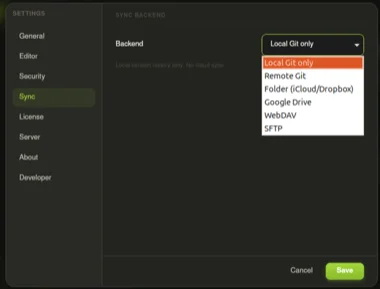
Sync your vault across macOS, Windows, Linux, iOS, and Android. Git-based sync means conflict resolution is built in. Self-host or use Claspt Cloud (Pro).
Secure Sharing
Password-protected sharing with expiry and burn-after-reading. Share entire pages or individual secrets with anyone — no account required on their end.
14 Themes
Nord, Dracula, Catppuccin, Tokyo Night, and 10 more. Your vault, your aesthetic. Switch themes instantly from the command palette.
Security you can verify, not just trust.
No black boxes. No "trust us" hand-waving. Claspt's security model is transparent, auditable, and built on proven cryptographic primitives. Every architectural decision is documented.
AES-256-GCM Encryption
Industry-standard authenticated encryption. Each secret block gets its own unique nonce. Tamper-evident — if a single bit changes, decryption fails.
Argon2id Key Derivation
Your master password is stretched using Argon2id — the winner of the Password Hashing Competition. Memory-hard and GPU-resistant by design.
Memory Safety (Built in Rust)
The encryption core is written in Rust — no buffer overflows, no use-after-free, no null pointer dereferences. Memory safety without a garbage collector.
Sync-Safe Architecture
Encrypted blocks are opaque blobs during sync. Git sees only ciphertext. Even if your sync provider is compromised, your secrets remain encrypted.
What's encrypted vs. what's not
Encrypted
- Secret block values (passwords, API keys, tokens)
- Secret block field names (custom labels)
- Attachment contents
Plaintext (By Design)
- Note titles and markdown body text
- Tags and folder structure
- Git commit metadata
Why plaintext for non-secrets? Because full-text search, Git diffs, and grep all require readable text. Encrypting everything would break the features that make Claspt useful. Secret blocks are the only things that need encryption — and they get military-grade protection.
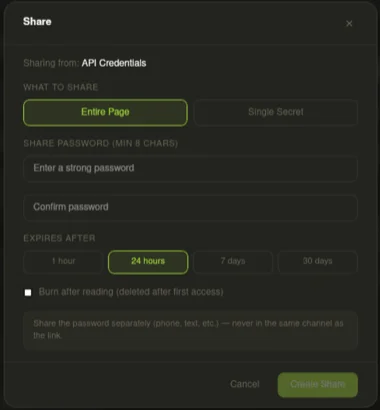
Password-protected sharing with expiry and burn-after-reading.
Built for people who think in context.

Developer
"My deploy notes reference the exact API keys they need. No more tabbing between 1Password and Notion."
- API keys embedded in architecture docs
- SSH configs alongside server notes
- Git version history for every change
- Cmd+K to find anything in milliseconds

Professional
"Client credentials, meeting notes, contract details — all in one place per project. No more hunting through email."
- Client vaults with project-specific secrets
- Meeting notes with embedded access codes
- Portable — switch laptops without migration pain
- Offline access for travel and client sites

Privacy-Conscious Individual
"No cloud accounts. No tracking. My data stays on my machine. I can verify the encryption because the code is open."
- Zero accounts required — no email, no phone
- Local-first — works entirely offline
- Self-hosted sync for the paranoid (in a good way)
- Open file format — no vendor lock-in ever

Small Business Owner
"Shared wifi passwords, vendor logins, bank details — all documented with context for my team."
- Business credentials with usage notes
- Vendor contacts with login details inline
- SOP documents with embedded access credentials
- Team sharing via Git (Pro feature)
Free forever on desktop. Pro when you need sync.
Free
Everything you need on a single device.
- Unlimited notes and secrets
- AES-256-GCM encryption
- Full markdown editor
- Instant full-text search
- Git version control
- Biometric unlock
- Desktop (macOS, Windows, Linux)
- Secret templates
Pro
Sync across all your devices. Mobile access.
- Everything in Free
- Cloud sync (iCloud, Google Drive, Dropbox)
- Remote Git sync (GitHub, GitLab, Bitbucket, self-hosted)
- Self-hosted sync (WebDAV / SFTP)
- Mobile apps (iOS + Android)
- Password-protected sharing with expiry & burn-after-reading
- Import from LastPass, 1Password, RoboForm, KeePass
- Git conflict resolution with in-app diff viewer
- Priority support
14-day free trial. No credit card required.
Frequently Asked Questions
What happens when my Pro trial ends?
You keep full access to all your notes and secrets on desktop. Sync and mobile access stop working until you subscribe. No data is deleted — ever.
Can I export my data if I stop using Claspt?
Your vault is already a folder of markdown files and encrypted JSON. There's nothing to export — just copy the folder. We don't believe in lock-in.
Is the free plan really free forever?
Yes. The desktop app with unlimited notes, secrets, encryption, search, and Git versioning is free forever. We make money from Pro sync subscriptions, not from locking basic features behind a paywall.
Do you offer team or business plans?
Not yet. Pro includes shared vaults for up to 5 people, which works well for small teams. Dedicated team and enterprise plans are on the roadmap for later in 2026.
Can I share secrets with someone?
Yes, with Pro. You can create password-protected shared links with a configurable expiry time and burn-after-reading mode — the secret self-destructs after the recipient views it once. Great for sending API keys, credentials, or sensitive notes to colleagues without leaving a trace.
Small, fast, and private.
~5MB Binary
Built with Tauri + Rust, not Electron. No bundled Chromium. No 200MB downloads. Claspt is lighter than most images on the web.
No Account Required
Download, open, create a vault. No email. No phone number. No verification. No "sign in with Google." Just you and your data.
Your Data Stays Yours
Your vault is a folder on your filesystem. Markdown files you can read with any text editor. No cloud requirement. No telemetry. No analytics. No ads.
Keyboard-First
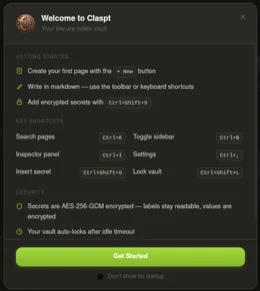
Command palette. Vim-style shortcuts. Cmd+K for search. Cmd+Shift+S for secrets. Cmd+/ for slash commands. Your hands never leave the keyboard.

Your vault is waiting.
Free download. No account. Start in 30 seconds.
Or start your 14-day Pro trial with mobile sync.
Coming from another tool?